Watch
See a T1 season in 75 seconds
One working day for Sarah, a senior preparer at a sample firm: a complete queue, every figure beside its source, the slip a client never sent, caught, and the data moving between your tools.
Watch the full film, about two minutesEvery client and figure is fictional. Music: "Inspired" by Kevin MacLeod (incompetech.com), CC BY 4.0.
Where your firm wins
Your practice software stores the files and your tax software files the return. The work in between is where your season goes. Here is what changes for your team.
What BrightHarbour does in the working app today, ready for the 2027 season. Books are powered by BlueAnchor, below.
 BlueAnchor
For bookkeepers: books done all year, so tax season starts from finished books
BlueAnchor, from Blue Harbour Solutions, connects directly to BrightHarbour. It is built to replace Dext, Hubdoc and Uncat for your bookkeeping clients.
See BlueAnchorTax slips never go through BlueAnchor: they stay with BrightHarbour.
How it fits
Your tools stay. BrightHarbour works in between.
Your clients keep the portal they know and your team keeps its tax software. BrightHarbour sits in the middle and does the work none of them do.
Where your clients work
 BrightHarbour
- Builds each client's checklist from last year
- Checks every upload on arrival
- Reads slips and receipts
- Puts each figure beside its source
Works behind your tools, or gives clients a private page on their phone.
Where your team works
QuickBooks Online XeroBeing built with a working Canadian firm that runs Karbon and CCH iFirm. The working app is live for founding firms and tested on fictional clients; the first real season is 2027. Logos show tools firms use today; BrightHarbour is independent of them. See every integration.
See it in action
Run a T1 season on a sample firm
Seven fictional clients, from the signed proposal to the filed return. Press each step and watch what BrightHarbour does and where the data goes, behind Karbon or up front with your own branded portal. About ten minutes, no sign-up.
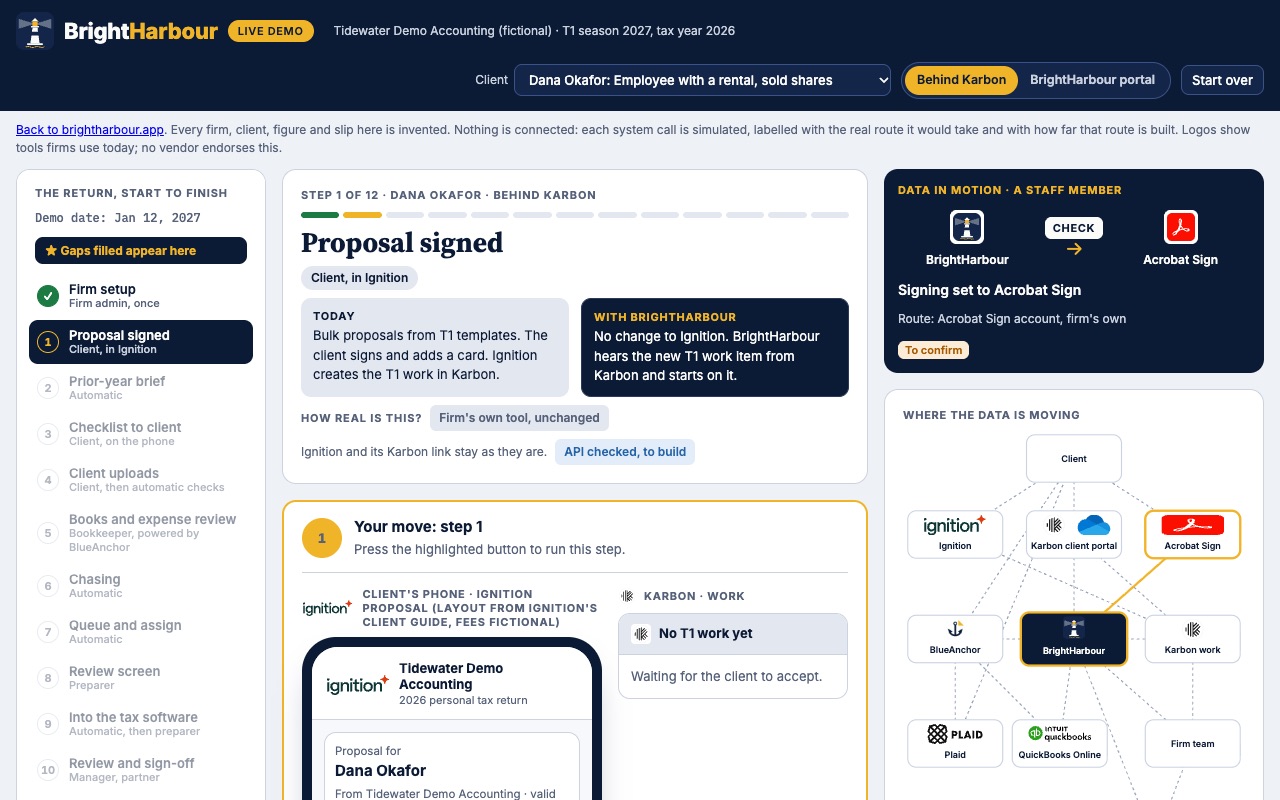
Open it full screenEvery client, figure and slip in the demo is invented. Nothing is connected.
Questions
Ask us anything
What it does, how it works with your tax software and Karbon, where client data is kept, or how to start. Answers come from our help centre, and a person is one click away.

Built in Nova Scotia, with a Canadian firm on Karbon
Trevor Jamieson, founder of Blue Harbour Solutions. Twenty years across the owner, sales, vendor and cloud partner sides of technology decisions. BrightHarbour is being built alongside a working Canadian accounting firm, one T1 season at a time.
See where your T1 season leaks time
Thirteen quick questions, a score for each stage of your season, and the first thing to fix. Free, and no sales call.
Rather talk? Email trevor@brightharbour.app